Free Tax Calculator for Retirees Using Form 1040-SR
This calculator began as our 2025 Form 1040-SR forecast tool and has been updated for the 2026 tax year. Check back later in the year for any IRS updates.
You can find tax tables to us with this calculator here at the IRS site: https://www.irs.gov/pub/irs-pdf/p1040.pdf
This tax calculator for retirees was created to help seniors, retirees, and near-retirees estimate their 2026 federal tax picture before filing. It is designed for people who want a practical way to forecast what they may owe, understand how much of their income may be taxable, and reduce unpleasant surprises during tax season.
If you receive income from Social Security, pensions, IRAs, 401(k) withdrawals, annuities, investment income, or part-time work, this tool can help you see how those amounts may work together on a return prepared using Form 1040-SR. Many retirees need more than a generic tax estimator because retirement income is often made up of several moving parts rather than a single paycheck.
This 2026 tax estimator for retirees is especially useful for people trying to plan ahead. A change in IRA withdrawals, required minimum distributions, pension income, capital gains, or additional earnings can affect taxable income more than expected. By using this tool before you file, you can better estimate your taxes, prepare for a payment, or decide whether additional withholding may be needed. Check back later in the year for IRS updates.
In plain terms, this tool helps answer a question many retirees ask: “How can I estimate my taxes for 2026 if I use Form 1040-SR?” It was built to provide a clearer forecast for retirement-focused tax situations, not just a basic one-size-fits-all calculator.
How to Use the 2026 Form 1040-SR Tax Forecast Tool
How to Use the 2026 Form 1040-SR Tax Forecast Tool
Our Form 1040-SR 2026 Tax Forecast Tool helps seniors and retirees estimate their federal income taxes using a Form 1040-SR style worksheet. The calculator includes retirement income, Social Security benefits, IRA distributions, pensions, deductions, credits, and withholding.
This free calculator reflects major federal tax provisions currently expected to apply during the 2026 tax year, including the enhanced senior deduction available through Schedule 1-A.
What This Calculator Helps You Do
The primary purpose of this calculator is to help you determine how much money you can withdraw from tax-advantaged retirement accounts (IRA, 401(k), 403(b), TSP, etc.) before you trigger any federal income tax liability.
Even if you do owe some tax, the first two tax brackets remain relatively low thanks to the 2017 Tax Cuts and Jobs Act and the later “Big Beautiful Bill” that extended those benefits.
Includes Social Security Taxation
Up to 85% of your Social Security benefits may be taxable depending on your total income. This calculator includes the official worksheet— Social Security Taxable Benefits Calculation—to determine how much of your benefits are taxable.
- Form 1040 or 1040-SR
- Schedule 1 (adjustments and additional income)
- Your SSA-1099 (Social Security benefits)
- Pension or annuity income
- IRA distributions
- Interest, dividends, capital gains, and other income
2026 Enhanced Senior Deduction
Many taxpayers age 65 and older may qualify for an additional deduction under current federal tax law.
- Up to $6,000 for a qualifying taxpayer.
- Up to $12,000 for a married couple when both spouses qualify.
- The deduction is calculated using Schedule 1-A.
- Enter the final deduction amount from Schedule 1-A on Form 1040-SR Line 13b.
The enhanced deduction is designed to reduce taxable income for seniors and may significantly lower federal income tax liability.
How to Use This Calculator
- Enter your estimated income numbers into each field.
- The calculator will automatically compute:
- Total income
- Adjusted gross income (AGI)
- Total deductions
- Taxable income
- Credits and payments
- Refund or amount owed
- Taxable portion of Social Security benefits
- Adjust your planned retirement withdrawals and see how the tax result changes.
- Use this to determine how much you can take from tax-deferred accounts without triggering unnecessary tax.
2026 Form 1040-SR Tax Forecast Summary
Social Security Taxable Benefits Workout
Worksheet 1. Figuring Your Taxable Social Security Benefits
| Line | Description | Amount |
|---|---|---|
| 1. | Enter the total amount from box 5 of all your Forms SSA-1099 and RRB-1099. | |
| 2. | Multiply line 1 by 50% (0.50). | |
| 3. | Combine the amounts from Form 1040 or 1040-SR, income lines (wages, interest, dividends, etc.). | |
| 4. | Enter the amount, if any, from Form 1040 or 1040-SR, line 2a (tax-exempt interest). | |
| 5. | Enter the total of any exclusions/adjustments (for example, adoption benefits, foreign earned income, or income of bona fide residents of certain U.S. territories). | |
| 6. | Combine lines 2, 3, 4, and 5. | |
| 7. | Enter the total of the amounts from Schedule 1 (Form 1040), lines 11 through 20, and 23 and 25. | |
| 8. | Is the amount on line 7 less than the amount on line 6? If Yes, subtract line 7 from line 6 and enter the result here. If No, none of your social security benefits are taxable. | |
| 9. | Threshold amount based on your filing status (generally $32,000 for married filing jointly, or $25,000 for the other statuses shown above). | |
| 10. | Is the amount on line 9 less than the amount on line 8? If Yes, subtract line 9 from line 8 and enter the result here. If No, none of your benefits are taxable. | |
| 11. | Threshold #2 based on your filing status (generally $12,000 if married filing jointly, or $9,000 for the other statuses shown above). | |
| 12. | Subtract line 11 from line 10. If zero or less, enter 0. | |
| 13. | Enter the smaller of line 10 or line 11. | |
| 14. | Multiply line 13 by 50% (0.50). | |
| 15. | Enter the smaller of line 2 or line 14. | |
| 16. | Multiply line 12 by 85% (0.85). If line 12 is zero, enter 0. | |
| 17. | Add lines 15 and 16. | |
| 18. | Multiply line 1 by 85% (0.85). | |
| 19. | Taxable benefits. Enter the smaller of line 17 or line 18. |
Enter the amount on line 19 above on line 6b in the 1040-SR worksheet at the top of the page
Enhanced Senior Deduction Worksheet (Schedule 1-A)
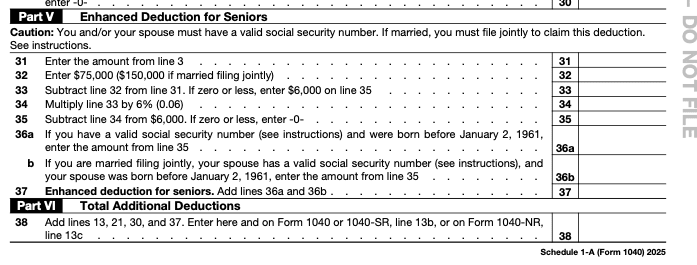
Use the Schedule 1-A worksheet to determine whether you qualify for the enhanced senior deduction available for the 2026 tax year. Most retirees only need to complete the senior deduction section of the worksheet.
After calculating your deduction, enter the amount from Schedule 1-A Line 38 into Form 1040-SR Line 13b in the calculator above.
If you want to see the entire Schedule 1-A form you can download it below by clicking the button.
IRS Form 1040-SR 2026 Draft
Click on this button to download the full form 1040 SR to compare with the data entry version above.
IRS Schedule A and Schedule 1-A Resources
Click on the button below to see the IRS Schedule A and Schedule 1-A resources for 2026.
Planning Retirement Income for 2026
This calculator is designed to help retirees estimate how Social Security benefits, IRA withdrawals, pensions, annuities, interest, dividends, and other income sources may affect their federal income taxes.
By adjusting income and deduction amounts, you can evaluate different retirement withdrawal strategies before filing your tax return.
The enhanced senior deduction may allow many taxpayers age 65 and older to reduce or even eliminate federal income tax on a portion of their retirement income.
Always compare your results with the latest IRS forms and instructions before filing your return.
This calculator and all related tools provided on RetireCoast are for informational and educational purposes only. They are not intended to replace professional tax, legal, or financial advice.
While we make every effort to provide accurate and up-to-date calculations, RetireCoast does not guarantee the accuracy, completeness, or timeliness of any results, estimates, or tax projections shown above. Tax laws, IRS forms, and instructions can change without notice, and mistakes can happen.
Users are fully responsible for verifying all numbers and results before filing any federal or state tax returns. You should confirm your entries using the official IRS forms and instructions, or by working with a qualified tax professional, CPA, or financial advisor.
By using this tool, you acknowledge and agree that RetireCoast is not responsible for any errors, omissions, penalties, interest, additional tax, financial loss, or other consequences arising from the use of this calculator or reliance on its output.
You further agree that you accept full responsibility for how you use these tools and the data they generate, including any tax filings, financial planning decisions, or withdrawal strategies based on the results.
This is not official IRS software and does not file or transmit your tax return.
By using this calculator and any related tools on RetireCoast, you agree to the following Terms of Use. Continued use of this website indicates your acceptance of these terms.
-
Informational & Educational Use Only:
All calculators and tools on RetireCoast are intended solely for general educational purposes. -
No Professional Advice:
Nothing on this website constitutes tax, legal, investment, or financial advice. Consult a qualified professional for personal guidance. -
User Responsibility:
You are solely responsible for entering accurate information. RetireCoast is not responsible for incorrect results due to user input or omitted information. -
No Guarantee of Accuracy:
While we strive to maintain accuracy, RetireCoast does not guarantee that calculations or tax estimates are current, complete, or error-free. -
Limitation of Liability:
RetireCoast shall not be liable for any losses, penalties, IRS letters, misfilings, financial decisions, or damages arising from the use of this tool. -
User Acceptance of Risk:
By using this tool, you accept full responsibility for all decisions and outcomes resulting from its use. -
No IRS Affiliation:
RetireCoast is not affiliated with the IRS. This calculator is not official IRS software and does not file your tax return. -
Privacy & Data:
RetireCoast does not store any information entered into this calculator. You are responsible for protecting your device and any sensitive data you input. -
Right to Modify:
RetireCoast may modify or discontinue this calculator or its terms at any time without notice.
If you do not agree to these Terms of Use, you must stop using this tool immediately.
If this article helped you, consider joining one of our RetireCoast memberships. Members receive access to deeper planning tools, worksheets, decision guides, and practical resources designed for real-world business, retirement, and estate planning decisions.


RetireCoast tools and resources are educational and practical planning aids. Legal, tax, financial, and business decisions should be reviewed with qualified professionals when appropriate.