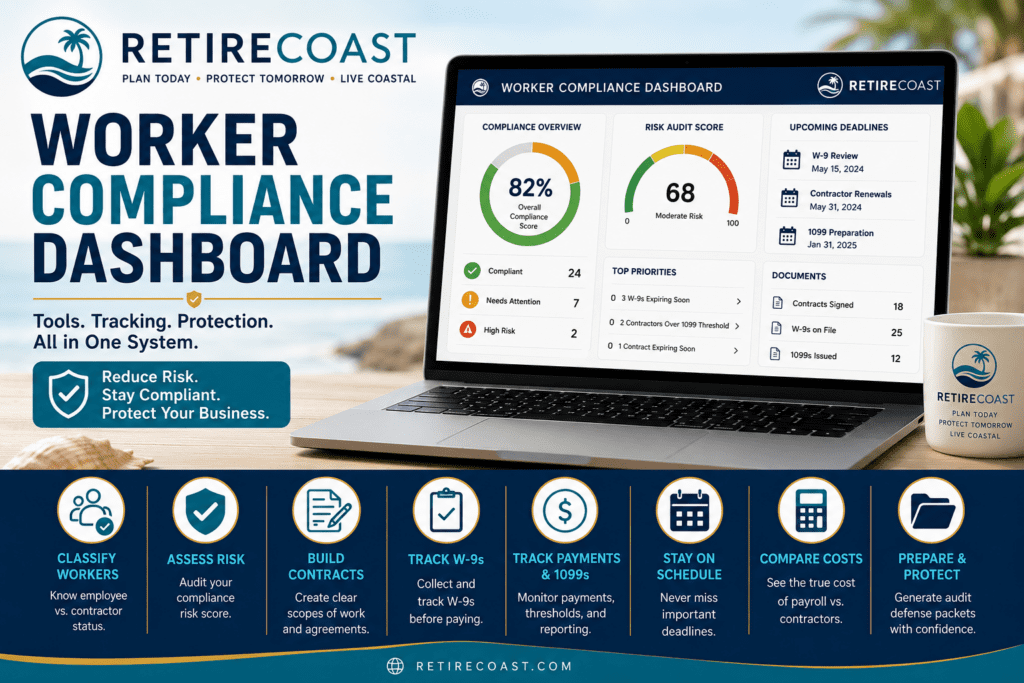
Use this dashboard to classify workers, document contractor relationships, track W-9 forms, monitor payments, compare payroll costs, prepare audit support, and maintain a practical compliance calendar.
This system is designed for small business owners who need an organized way to reduce worker misclassification risk and maintain better contractor documentation.
Start with the classification tool, then use the risk audit, scope builder, W-9 tracker, payment tracker, calendar, cost comparison tool, and audit defense packet generator as needed.
Evaluate whether a worker is more likely an employee, independent contractor, or borderline case.
Review your worker compliance risk and identify weak spots before they become expensive problems.
Create a written scope of work with payment terms, contractor status language, signatures, and compliance acknowledgments.
Track whether each contractor has provided a W-9 before payments create tax reporting issues.
Track contractor payments, 1099 thresholds, missing W-9 status, and year-end reporting preparation.
Create a practical calendar for W-9 reviews, 1099 preparation, contractor renewals, and annual compliance checks.
Compare the practical cost of using payroll employees versus contractors for your business needs.
Assemble a structured documentation packet to explain how and why contractor decisions were made.
This dashboard is part of the larger RetireCoast Worker Compliance System. Use the system page when you want the broader explanation, workflow, and supporting guidance.
Open Worker Compliance System Dashboard- Classify each worker before treating them as a contractor.
- Use the risk audit to identify weak documentation or borderline facts.
- Create a written scope before work begins.
- Collect and track W-9 forms before issuing payments.
- Track payments and 1099 status throughout the year.
- Use the calendar to review compliance regularly.
- Generate an audit packet if you need to organize your records.
The Worker Compliance Dashboard helps organize contractor and employee documentation. Business owners should also consider business formation, operating records, insurance, tax records, and estate planning as part of a broader protection strategy.